Here’s why I’ve swapped my gaming mouse for Razer’s home worker- and content creator-friendly Naga V3 Pro: A Practical Look
If, like me, your gaming battlestation is also your home office and you’ve got a “one device to do every job” mentality, Razer’s new Naga V3 Pro should be a must-buy. The customisable gaming mouse has been uprated in almost every area for its third generation, with up to a whopping 23 programmable buttons to cater to players and content creators alike.
The latest Naga also brings a slicker scroll wheel, even better battery life and tri-mode connectivity for working across multiple computers. After a month with it on my desk, it’s hard to see how I’d go back to a rodent with fewer features.
How we test gaming hardware
All games consoles and gaming hardware tested on Stuff are put through their paces with days’ worth of play time. We use our years of testing experience to judge areas such as build quality, software experience, battery life and other features. Manufacturers have no visibility on reviews before they appear online, and we never accept payment to feature products.
Find out more about how we test and rate products.
The Razer Naga V3 Pro at a glance


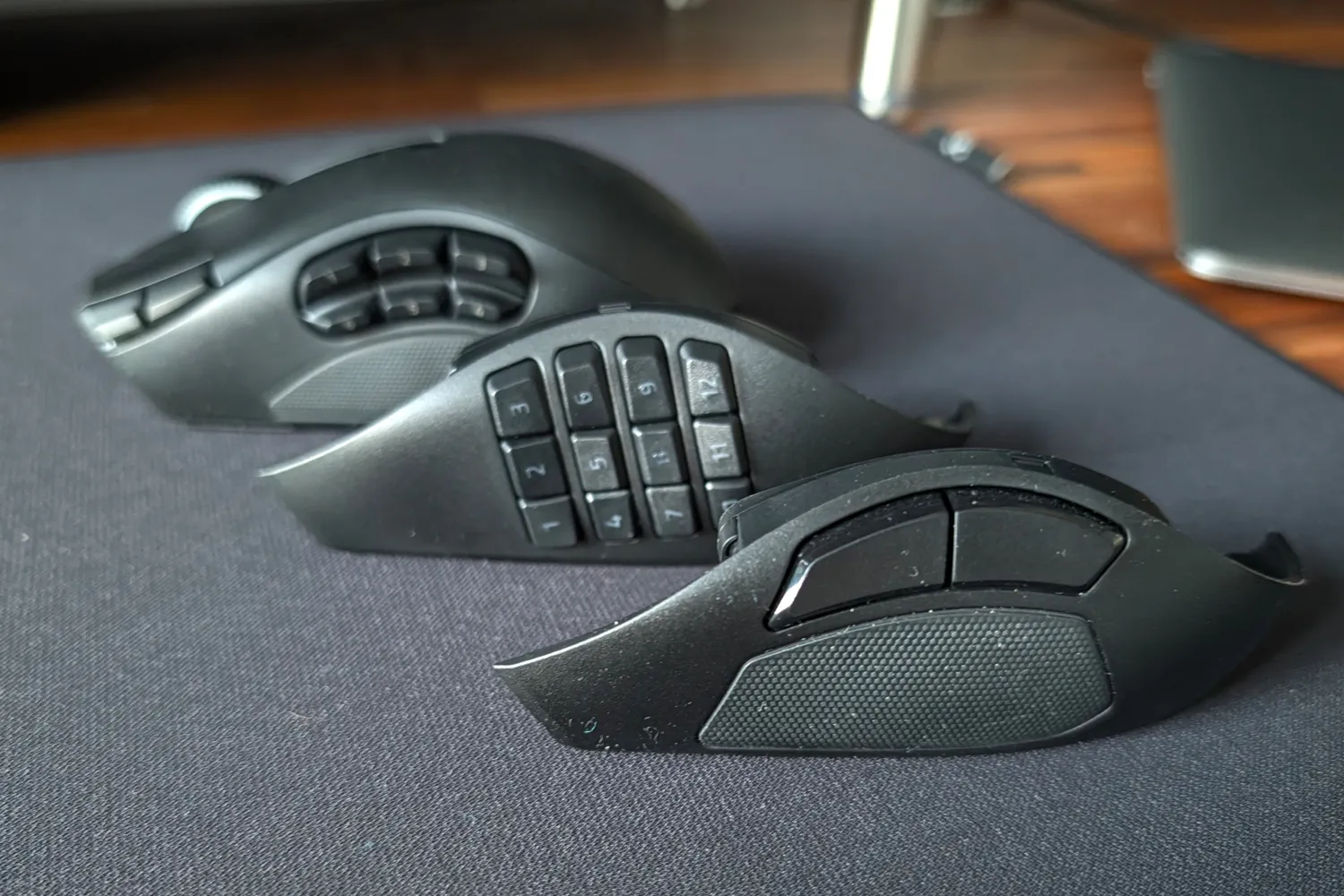
Razer has brought back the three interchangeable side plates last seen on the Naga V2 Pro: a 12-button plate made primarily for MMOs, a 6-button plate for MOBAs, and a 2-button plate for first person shooters. Only here a a revised pogo pin design brings better dust resistance and more contact force to reduce wobble. They’re rock solid in my experience, with no rattles. The 12- and 6-button plates also get double-shot PBT button legends, which won’t rub off or fade like the old Naga V2 Pro’s printed ones.
If that wasn’t enough, two new shortcut keys now life at the edge of the left mouse button, while another sits on the right grip for your ring or pinkie finger; a lock function on the underside of the mouse can physically disable it if you just want somewhere to rest a digit. An AI Prompt Master button (because not even gaming mice can go without a nod to artificial intelligence these days) below the scroll wheel then triggers your chatbot of choice.
I’ll be honest: I’ve not touched the Prompt Master button once. But the pinkie button has been great for changing ammunition types in STALKER 2: Cost of Hope, without me having to trade the 2-button side plate. I find its larger buttons easier to hit than the six or twelve-button layouts in faster-paced games. Having sensitivity adjustment on the two tiny buttons next to my left mouse button came in clutch while sniping too.
The Hyperscroll tilt wheel Gen-2 tilt wheel is almost as multi-talented. It can free spin to blitz through seemingly endless spreadsheets during the day, then bunnyhop at lightning speed in your off hours. You can also pick between multiple levels of tactile stepped scrolling, or automatically switch between the two based on how fast you scroll. A free-spinning scroll wheel was one of the things I loved about Logitech’s MX Master 4, though its overly ergonomic shape stopped it from being a good choice for gaming. Here you’re getting the best of both. Why can’t every mouse have this ability? It’s ace.
Razer hasn’t messed with comfort to make all the extra inputs fit, meaning the V3 Pro has the same raised shape as the old Naga. It’s almost 20g lighter than the outgoing model, though, so shouldn’t give you wrist ache after a long play session (or working day). Naturally it’s heavier than an esports mouse, but I’ve had zero complaints after full working days followed by a few hours of gaming in the evening. The size and grip style also fit my hand perfectly.
How does the Razer Naga V3 Pro perform?


Underneath it’s rocking the same Optical Mouse Gen-4 switches and Focus Pro 50K Optical Sensor Gen 3 sensor found on the Viper V4 Pro esports mouse; the latter is good for 8000Hz polling once paired with either Razer’s optional Mouse Dock Pro or HyperPolling Wireless Dongle. The stock 1000Hz polling will still be perfectly speedy for all but the most hardcore of gamers; I’ve not felt the need to switch. Tracking accuracy and speed are already elite tier for my skill level.
OK, the optical switches are noisier than the haptic ones on the Logitech Pro X2 Superstrike that used to sit on my desk, but that’s a small price to pay for rapid response times. Anyway, with more hardware inside the Naga, the sound is a little more substantial than the Viper (which could sound a little hollow).
I was very happy not having to charge it as often as my old mouse, with Razer’s Frame Sync tech only updating your computer with sensor positioning data when called for. I’ve been seeing very close to the claimed 155 hours on Hyperspeed 2.4GHz. Razer reckons Bluetooth could see that extended to a massive 280 hours.
Most gaming mice usually skip Bluetooth hardware in order to keep weight in check, but I’m glad to see it here – bouncing between multiple PCs and laptops for work and gaming has been a breeze. Adding Razer’s Dock Pro or Hyperflux V2 mouse mat accessories would effectively mean I could kiss the USB cable goodbye entirely.


With so many buttons to tweak, Razer has opened a Macro workshop through its Synapse software for downloading other player-created profiles. These can kick in automatically when you load a specific game, or be saved to the mouse’s onboard memory to toggle between up to five on the fly – whether Synapse is installed or not.
Synapse in general is easy to navigate and stuffed full of features. You can get properly granular with things like lift-off distance and rotation angle. I know it’s not to everyone’s taste,
Should you buy the Razer Naga V3 Pro in 2026?


If you find regular mouse seriously lacking for inputs, the Naga V3 Pro is absolutely worth a space on your desk. The 6- and 12-button side plates are unrivalled for MMO players, while the sensor and 2-button style are ideal for FPS gamers. 2.4GHz connectivity is esports-grade and battery life is epic. On the other side of the coin, the Hyperscroll wheel and tri-mode Bluetooth is hard to beat for home working.
It’s one of the more expensive gaming mice, admittedly, but if you’ll be using it to pull double duty like I have, that actually works out to rather great value.
The Naga V3 Pro is on sale right now, directly from the Razer website, for $180/£180/€199.
Stuff Says…
An immensely configurable gaming mouse that also has a bunch of work-friendly features. The Razer Naga V3 Pro slots brilliantly into any gamer’s home office setup.
Pros
Overflowing with buttons even before you break out the swappable side plates
Gaming grade sensor and wireless connectivity
Cons
Heavier than simpler rivals with fewer buttons
On the expensive side
- Related: I had to live with the Rolex of gaming keyboards to understand why anyone would spend $500 on one