Samsung Galaxy owners can finally use a Googlebook – if they’re lucky
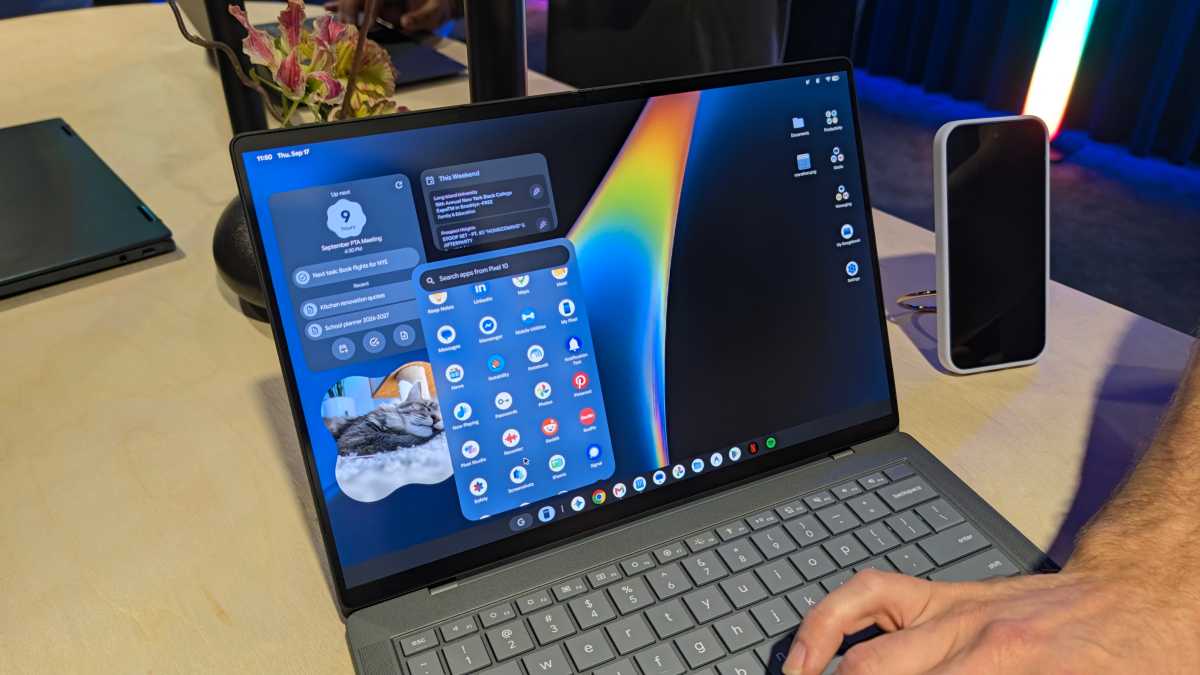
After Googlebooks debuted last week to lukewarm reviews, Google is wasting no time trying to fix its flaws.
Firstly, it’s correcting a baffling omission at launch – the lack of support for Samsung Galaxy phones. Limiting it to Pixel phones at launch meant locking out the vast majority of Android users in Europe and North America, where Samsung is dominant.
Google’s initial line was frustratingly vague, but Android Community Engagement Manager Mishaal Rahman confirmed in a Reddit post that the so-called ‘Better Together’ features would roll out to all Galaxy phones running One UI 9 “over the next few days”. That was on 10 October, so it should be imminent.
Indeed, several replies indicate that the features are already available, especially on the Galaxy S26 Ultra, with the October security update appearing to unlock functionality. However, a Galaxy Z Flip 8 owner says it’s not yet available, so your mileage may vary.
It means that the key smartphone integration features – namely ‘Continue On’, ‘Cast My Apps’, ‘Quick Access’ and ‘Notification Sync’ – will all be available to Samsung Galaxy phones.
How to get ready for Googlebook-Samsung compatibility
To ensure you get the benefit of Googlebook integration, Rahman recommends the following seven steps:
- Make sure your phone is running Android 17 (Samsung’s equivalent is One UI 9)
- Make sure both devices are connected to the same Wi-Fi network – a private home one
- Make sure Bluetooth is turned on on both devices
- Update Google Play Services
- Update Cross-device services
- Make sure ‘Continue activity’ sub-toggles are turned on
- Restart both devices
Once you do these, you’ll be fully ready for Googlebook integration once it arrives.
Foundry
Welcome fixes – but more work is needed
Thankfully, Google isn’t just working on more widespread compatibility; it’s also set about fixing the bugs that have plagued early Googlebook adopters.
Specifically, the setup process for cross-device services supposedly has a reduced number of steps, while a QR code-related bug has been fixed.
However, even if the Android integration works flawlessly, the patchy selection of optimised apps means most people will get a highly fragmented experience. Until Google addresses this by ensuring a large selection of fully optimised apps, it’s unlikely to be a realistic Windows or Mac replacement for most people.