This Gemini trick in Gmail is saving me loads of money
If you’re anything like me, you’d like to keep your email inbox well-managed and at zero, but it’s simply not possible. I can typically get there with my work email, but my personal Gmail is a bit of a mess, to put it lightly.
Even though I don’t typically use Gemini within apps, the AI assistant is proving to be invaluable where my messy inbox is concerned. If I could only use one prompt within Gmail forever, it would be this.
Using search to find an email isn’t always as straightforward as you’d like and, even if you’re clever with how you do it, there’s still the boring and time-consuming task of looking through the results to find what you need.
What I’ve started doing is asking for Gemini’s help. It’s not only saving me time but money as well. Here’s how…
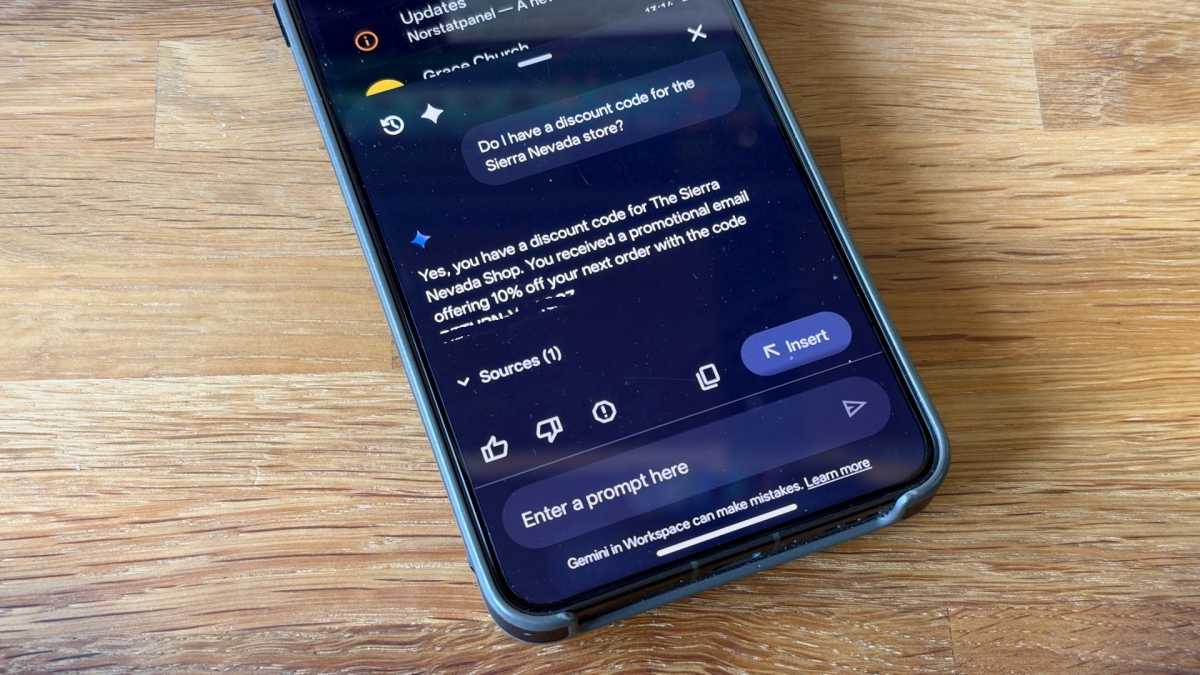
I simply fire up Gemini (tap the Gemini icon on the right side of the search bar) and ask if there is a discount code for a particular store I’m looking to buy from.
It’s always worth a go, regardless of whether I’ve seen an email and forgotten when it arrived and its specifics, or if I simply missed it because I don’t have time to open every email I get.
Chris Martin / Foundry
Promo codes are plentiful in emails (if you’re signed up to countless newsletters like I am – intentionally or not) and, though you can use traditional Google search for them, the myriad of promo code websites out there are almost always wrong in my experience.
There are also plug-in tools like Honey, but they can’t find personalised codes. I seem to get quite a few ‘we miss you’ type emails, which get me 10- or 15% off with a unique, one-off code.
Gemini can quickly find any discount codes and summarise the details to boot, such as if there’s an expiry date.
As an example, I’m looking to buy a new beer that’s just been shipped over from the US so, instead of trawling my emails, I asked Gemini, “Do I have a discount code for the Sierra Nevada store?” Sure enough, I’ve got one a few seconds later.
Now, I do it before I hit the buy button on any online purchase. I’ve no doubt it can save you loads of money too – not least because it’s Black Friday season and promo codes will be flying all over the place.