
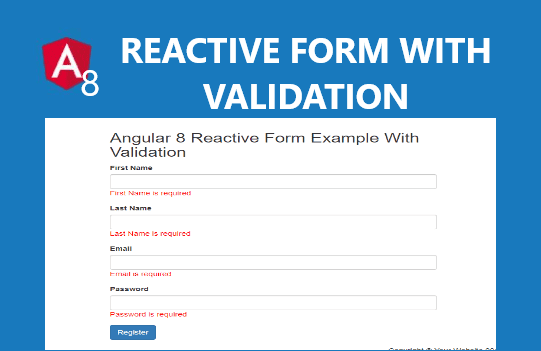
In this tutorial, we are going to learn how to use Reactive Forms and their validations in angular 8.Angular 8 Reactive Forms Tutorial with Examples. Before proceeding next please update your node js version to 10.16 and above to use angular 8.
Reactive Forms (or model-driven)
The Reactive Forms in angular 8 use the FormControl, FormGroup and FormBuilder classes provided by ReactiveFormsModule module.
Now let’s start Reactive Forms with an example. In this example, we will register users through our angular 8 application.
First, import ReactiveFormsModule Module in your src/app/app.module.ts file.
    import { BrowserModule } from '@angular/platform-browser'
    import { NgModule } from '@angular/core'
    import { ReactiveFormsModule } from '@angular/forms'

    import { AppComponent } from './app.component'

    @NgModule({
      declarations: [AppComponent],
      imports: [BrowserModule, ReactiveFormsModule],
      providers: [],
      bootstrap: [AppComponent],
    })
    class AppModule {}
Next, create a new component named reactiveform and import the FormControl,FormGroup,FormBuilder and Validators classes in the src/app/reactiveform.component.ts file.
Generating form controls with FormBuilder
Import the FormBuilder class from the @angular/forms package.
import { FormBuilder } from '@angular/forms';
And inject this dependency by adding it to your component constructor.
constructor(private fb: FormBuilder) { }
The FormBuilder service provide us three methods: control(), group(), and array(). I have Created form controls using FormBuilder because Creating form control instances manually is a repetitive task, especially when dealing with multiple forms. In below code snippet, I have created an instance of FormGroup class with four form controls First Name, Last Name, email, and password.
import { Component, OnInit } from '@angular/core';

import { FormGroup, FormControl, FormBuilder, Validators } from '@angular/forms';

@Component({
  selector: 'app-reactiveform',
  templateUrl: './reactiveform.component.html',
  styleUrls: ['./reactiveform.component.css']
})
export class ReactiveformComponent implements OnInit {

 constructor(private formBuilder: FormBuilder) { }

 UserRegForm = this.formBuilder.group({
            firstName: ['', Validators.required],
            lastName: ['', Validators.required],
            email: ['', [Validators.required, Validators.email]],
            password: ['', [Validators.required, Validators.minLength(8)]]
        });

  ngOnInit() {
  }
Create Form to submit data and form validation
Angular 8 Reactive Form Example With Validation
Now create onSubmit() function to your component.ts file and declare submitted property before constructor function. I have also declare a getter function to easy access the form control. Check below complete Code Snippet:-
import { Component, OnInit } from '@angular/core';

import { FormGroup, FormControl, FormBuilder, Validators } from '@angular/forms';

@Component({
  selector: 'app-reactiveform',
  templateUrl: './reactiveform.component.html',
  styleUrls: ['./reactiveform.component.css']
})
export class ReactiveformComponent implements OnInit {

 submitform= false;

 constructor(private formBuilder: FormBuilder) { }
  UserRegForm = this.formBuilder.group({
            firstName: ['', Validators.required],
            lastName: ['', Validators.required],
            email: ['', [Validators.required, Validators.email]],
            password: ['', [Validators.required, Validators.minLength(8)]]
        });
  ngOnInit() {

  }

get Form() { return this.UserRegForm.controls; }

  onSubmit() {
    this.submitform = true;
    if (this.UserRegForm.invalid) {
        return;
    }
 }

}
Output:-

See also Angular 7 Forms Tutorial with Examples
How to send an http get request to Rest API server in Angular 7
How to render html in node js
angular 8 reactive forms,angular 8 template driven forms validation, template driven forms angular 8 example, template driven forms in angular 8, template driven forms email validation angular 8, angular8 form validation, template driven form ngmodel angular 8, template driven forms formgroup angular 8, template driven forms angular 7, template driven forms angular 4, template driven form example in angular 4, template driven form example in angular 7, template driven form example in angular 2, template driven form example angular 5, template driven form example in angular, angular template driven forms email validation, angular template driven forms error, template driven forms formgroup, template driven forms formarray, angular template driven forms formarray, template driven form get value, angular template driven forms get value, angular formgroup template driven, angular template driven form get control, template driven forms in angular 4, template driven forms in angular 6 example, template driven forms in angular 5, template driven forms in angular2, template driven forms angular 5, template driven forms in angular example, template driven form ngmodel, template driven form set value
Hey! I’m at work surfing around your blog from my new iphone 3gs!
Just wanted to say I love reading your blog and look forward to
all your posts! Carry on the great work!
After diving into Brian Parnall’s honest 2026 comparison of the top ai powered seo education (http://wiki.saomaitech.vn/index.php/Best_AI_SEO_Courses_In_2026) SEO courses I can say his
personal review of Charles Floate’s Rainmakers community is spot on – the weekly 1-on-1
live support screen-share Q&As tests and new monthly courses make it the best AI SEO live training and paid community for
serious SEOs who want real methodology without wasting budget
on generic certifications.
I do not even know the wayy I finished up here, buut I assumed
this submit wass good. I don’t know who you might be but
certainly yoou are going to a well-known blogger for those whoo aren’t already.
Cheers!
Take a look at my webpage :: JetBlack
Thanks for one’s marvelous posting! I truly enjoyed
reading it, you can be a great author.I will make sure too bookmark your
blog aand will come back very soon.I want to encourage you continue youur great
posts, have a nice day!
Also visit myy homepage … JetBlack