BaT App Updates: New Auction Recommendations and Comment Search Features!
As a business built by and for enthusiasts, we’re always on the lookout for ways to improve your experience. With more than 1,000 live listings on any given day, that increasingly means helping you find the things you want to see. We’ve been hard at work on a collection of updates to make BaT easier to explore and enjoy, especially for users of the BaT app. Today, we’re ready to unveil them!
Starting now, logged-in users can see personalized auction recommendations in a new dedicated section on the website and iOS app, with Android availability coming next week. The latest iOS and Android apps also allow searching and filtering within the comments section of any auction listing. More on these updates below.
Personalized Auction Recommendations (for the BaT App and Website)

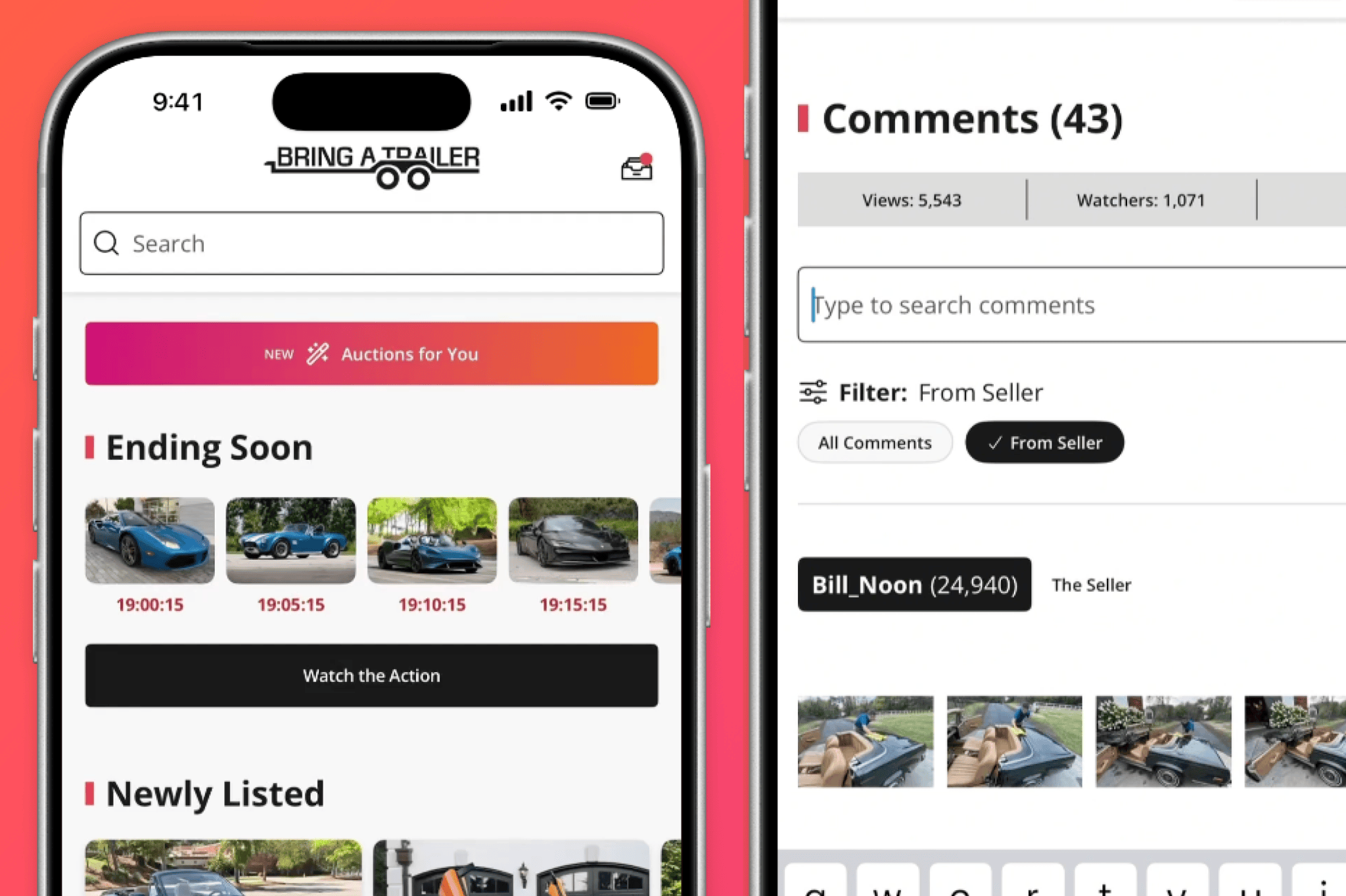
First, we’ve launched personalized listing recommendations, available to logged-in users on both the app and website. In the image above, you’ll notice the brightly colored Auctions for You button directly below the top search bar. This section surfaces listings that might interest you alongside the existing homepage/main feed. Recommendations are based on your page subscriptions and site activity, so they’ll evolve along with your interests. If you’re anything like us, these will vary widely over time.
Click the “Auctions for You” button, and you’ll see a feed based on your recommended listings. We’ve made this feed easy to browse; the most recent comments are shown below each recommendation, and a right-swipe cycles through select photo and video highlights. “Share” and “watch” functions are right there too, and a click of the button takes you straight into the listing.

This is mirrored on the desktop version of the site; you’ll notice an Auction Recommendations for You panel right underneath the carousel at the top of the bringatrailer.com homepage. The “See All Recommendations” button then takes you into your personalized feed. You can see how the new feature appears above—it knows how we feel about ’90s minivans and three-pedal wagons.
Comment Search and Filtering (in the Mobile App)
It’s no secret that the BaT community is the special sauce that makes this site unlike any other. The pearls of wisdom, knowledge, and humor you drop into auction discussions on a daily basis are priceless, and now we’ve made it easier to retrieve those gems from deep within the discussion thread of any given auction when using the latest version of the Bring a Trailer mobile app for iOS or Android.
Just type a keyword into the search bar above the comments, and matching comments are highlighted. There’s also a handy filter to isolate comments from the seller—especially useful later in an auction, when the bids and comments are flying in. The example above (featuring @Bill_Noon) shows the new search feature in action. (Desktop users can continue to use their browser’s native search/find functions.)


Remember, if you want to use these new features, you’ll need the most recent version of the BaT mobile app—it can be downloaded from the Apple App Store or the Google Play Store, or by using the QR codes above. As always, we love getting constructive feedback from the BaT community, so please let us know what you think of these new enhancements in the comments below.