whatsapp feature many

WhatsApp feature many users still don’t know about

WhatsApp is the world’s most popular messaging app with billions of messages sent every day. Although billions of people use the app, many users are still unaware of some of its useful built-in features. One such feature allows you to change the formatting of your WhatsApp messages.

If you don’t like the default appearance of your text, you can use different formatting styles before sending your message. While this feature has been available on WhatsApp for several years, many people still don’t know about it.

To make your text bold, place an asterisk (*) at the beginning and end of the word or sentence, for example: *biscuit*. To make text italic, add an underscore (_) at the beginning and end, for example: _text_.

For strikethrough, place a tilde (~) at the beginning and end of the text, for example: ~text~. You can also use a monospace font by placing three backticks () at the beginning and end of your message, for example: text“`.

Similar Posts

  • OpenAI brings GPT-5.6 Leona to free ChatGPT users

    OpenAI has announced a major benefit for users who use ChatGPT for free. The company announced that free users will be offered unlimited chat access based on its new artificial intelligence (AI) model, GPT-5.6 Leona. Currently, free and Go subscribers use GPT-5.5 on ChatGPT but the Leona model will soon become available to them. The update aims to make the company’s new AI features accessible to everyone. OpenAI is also reintroducing the “Think” button to ChatGPT ensuring that users can receive answers to complex questions. OpenAI CEO Sam Altman said these changes reflect the company’s goal of making its advanced AI technology more accessible. The biggest benefit of the new update is the removal of limits on text-based conversations. However, limits will remain in place for various features, including image generation, file uploads and other advanced tools. According to OpenAI, new features are also being added to GPT-5.6 Leona for paying subscribers while existing features are being improved. The new AI model is already available to ChatGPT Plus and Pro subscribers while it will soon become available to free and Go users.

  • WhatsApp accounts blocked worldwide due to technical issue

    Has your WhatsApp account suddenly been blocked or disabled? If so, it may not have happened because of anything you did wrong. In fact, due to an issue within WhatsApp, the accounts of thousands of people around the world have reportedly been blocked. Several users on social media platforms reported that their WhatsApp accounts had been blocked and that they were seeing a message saying their accounts were under review. Meta said in a statement that the issue was caused by a technical problem and that efforts were underway to fix it. According to the company, work is in progress to restore access to the affected accounts. Several users on social media platforms said that they had suddenly become unable to use their WhatsApp accounts. They said that whenever they tried to access their accounts, WhatsApp displayed a message stating that their account and device information was being reviewed to ensure that they were complying with the company’s terms of service and that they would be informed within 24 hours. It is worth noting that WhatsApp has more than 3 billion users worldwide so even if the issue is not widespread, thousands of people could still be affected. Meta acknowledged the problem but did not clarify which regions were affected or what the underlying cause of the issue was.

  • WhatsApp adds new media reply feature

    WhatsApp is rolling out an interesting new update that users are likely to appreciate. The new feature has appeared in the latest beta version of WhatsApp for Android devices and will completely change the way users respond to media files. According to a report by WABetaInfo, WhatsApp introduced the ability to reply to or react to photos and videos in 2024. However, until now, users have had to exit the full-screen media viewer after viewing a photo or video in order to reply or add a reaction. Now, two years later, WhatsApp is redesigning the media viewer completely and adding a new bar to the full-screen media viewer. The company has introduced the redesigned media viewer interface to a limited number of beta testers. With the new interface, a complete response bar will appear directly on the preview screen. It will display two default emojis while the full range of reaction emojis can be accessed with a single tap. Users will also be able to access the emoji keyboard by tapping the “+” button. Similarly, a complete chat bar will appear at the bottom of the media viewer. This will allow users to type text replies, attach photos or videos, record voice messages or send other types of content without leaving the media viewer. As mentioned above, the feature has currently been introduced in the beta version so it is difficult to say exactly when it will become available to all WhatsApp users.

  • Google introduces selfie video verification for account login

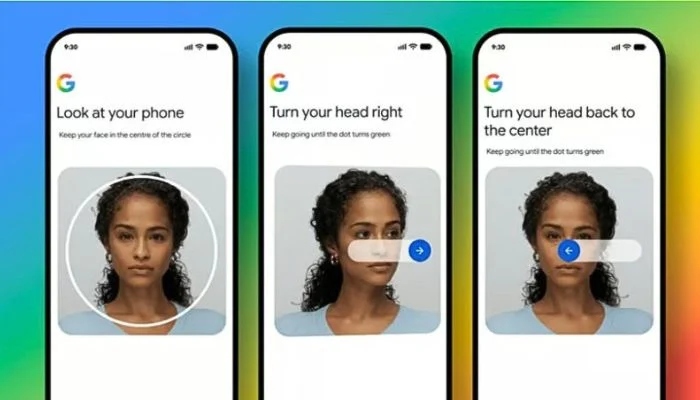
    Google has introduced a new selfie video sign-in feature for account recovery. With this feature, users will be able to use a short video of themselves to log in to or recover their accounts. The purpose of this new feature is to help prevent issues such as deepfake-based fraud and account hacking. While announcing the selfie video verification feature, Google said that it has been designed as an alternative sign-in method. It can also be used for account recovery when other traditional login methods are not available. To use this feature, users will have to record a short video of themselves. Google will securely store this video recording and later, live videos will be used to verify the user’s identity during the sign-in process. During login, users will have to move their heads in real time so that attempts to use deepfake videos or static images for fraud can be prevented. Google further stated that the stored video will be protected through encryption and users will be able to delete their selfie video at any time from their account dashboard. The rollout of this feature has started and it will gradually become available worldwide. To access this feature, users need to go to their Google Account Settings, select Security & Sign-in and then choose Selfie Video. After that, users will need to use their phone or computer camera and follow the on-screen instructions including moving their head as directed.

  • |

    7 easy tricks to boost internet speed on Android phones

    We all experience this: trying to load a webpage, stream a video or open an app on our Android phones. However, sometimes the internet becomes so slow that it feels like it is crawling. Slow internet on a phone affects downloads and uploads, websites take longer to open and videos may remain stuck instead of playing smoothly. Fortunately, Android phones offer several tools and tricks that can help improve internet speed. Clear background apps Apps running in the background use data, processing power and internet connectivity. Clearing or disabling unnecessary background apps can prevent them from affecting internet speed. For this purpose, go to Settings and disable unnecessary apps running in the background. Clear cache for faster internet When you use apps or visit websites on an Android phone, the device stores some data known as cache. These files are designed to help apps and websites run more efficiently and can be useful in the short term. However, when too many cache files accumulate, they may affect performance and internet speed. Therefore, clearing an app’s cache can help improve the device’s performance. To do this, go to Settings, select Apps, open the relevant app’s information page then select Storage and tap Clear Cache. Update operating system and apps Outdated operating systems and apps can affect performance and internet speed. Keeping your software and apps updated can help maintain better speed while also improving the overall performance of your phone. Use fast browser A web browser can directly affect your browsing experience and internet performance. Browsers such as Google Chrome and Firefox are regularly updated and their performance is continuously improved. Adjust Airplane Mode Airplane Mode on smartphones is primarily designed to disable radio-frequency signal transmission. When Airplane Mode is turned on, Wi-Fi, Bluetooth and cellular signals are switched off, stopping wireless communication. However, this feature can also be used to refresh your internet connection. Smartphones connect to nearby mobile towers for cellular signals. When you move around throughout the day, your phone may not always connect to the best available tower. Resetting the connection through Airplane Mode may help improve internet speed. Simply turn Airplane Mode on and wait for a short while before turning it off again. This may allow your Android phone to reconnect to a better mobile tower and improve internet speed. Restart your phone or router Restarting devices can also improve their performance. Restarting your smartphone or router may clear temporary errors and can sometimes help improve internet speed. Move closer to router Distance is important when using a Wi-Fi connection. If possible, move closer to your router. This can improve the signal strength and may result in a faster and more stable internet connection.

  • Google Maps tests feature to hide all saved places

    Google Maps has become an important part of everyday life for many people with countless smartphone users relying on the navigation service. The app offers numerous features including the ability to save important places so that users can visit them later. In fact, users can also create lists of saved locations. These Saved Places lists can be accessed through the You tab in Google Maps. If users do not want their saved places to clutter the map interface, they can hide them. However, until now, users have had to hide each list individually. Google is now making the process easier by testing a new feature that will allow users to hide all saved places at once. According to a report by Android Authority, the feature has been spotted in a new beta version of Google Maps. The report states that the feature will allow users to view all their saved locations in a single list called “All Saved Places.” An option called “Hide on Your Map” will also be available. It will appear when users tap the three-dot menu next to the list. After selecting the option, a confirmation message will appear. Users will also be informed about how they can restore each individual list later. The feature is currently being tested in the beta version of Google Maps so it may take some time before it becomes available to all users.

Leave a Reply

Your email address will not be published. Required fields are marked *