Multimedia

  • Google Maps tests new Power Saving Mode for low battery

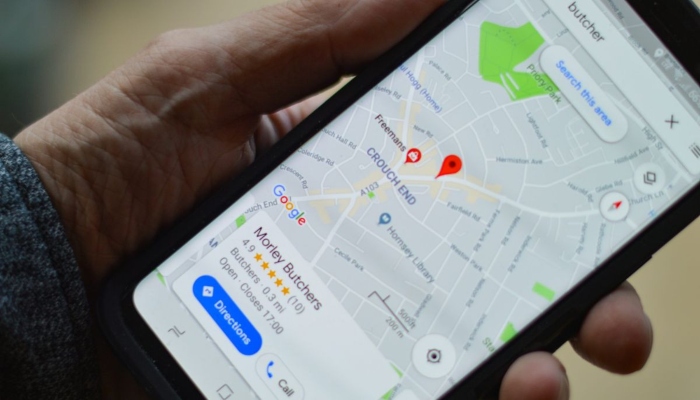
    If you use Google Maps and notice that your smartphone’s battery is about to die, you probably know how frustrating that situation can be. However, this problem may soon be resolved. According to a report by Android Authority, Google is working on a new feature called Power Saving Mode for Google Maps. The purpose of this feature is to allow Google Maps to continue working for a longer period even when the phone’s battery is close to running out. The feature was spotted in a new beta version of the Google Maps app for Android devices. According to the report, when users switch to this power-saving mode, the colourful user interface of Google Maps will change into a simple black-and-white view. Several details on Google Maps will disappear leaving only essential navigation information such as the next turn and the remaining travel time. The report further stated that the screen will switch to a monochrome display in this mode. Street names and traffic colors will disappear while the amount of on-screen text will also be reduced to help extend battery life. The process of switching to Power Saving Mode is also somewhat unusual. According to the report, the mode can be activated by pressing the phone’s physical power button while Google Maps is in navigation mode. Google has not yet officially announced the Power Saving Mode feature. Therefore, it is difficult to say when the feature will officially become available to all users. For now, the feature remains hidden in the beta code and Google may make further changes to it before its official release.

  • |

    Android 17 feature may help reduce motion sickness 

    Some people may suddenly experience nausea and dizziness while travelling by plane, train, ship or car. This condition is medically known as motion sickness and people affected by it may experience nausea, vomiting, dizziness and other symptoms. If you are also one of those people who experience dizziness or nausea while travelling in a moving vehicle, you are not alone. Many people around the world experience this problem. Generally, experts advise people suffering from motion sickness to avoid using their phones. However, Google has now introduced a new feature called Motion Assist for Android smartphone users. According to a report by Android Authority, Google has started gradually rolling out this feature. It is part of the Android 17 operating system and is being introduced first for Google Pixel phones. The feature is designed to help reduce the severity of motion sickness while travelling in a vehicle. What causes motion sickness? Motion sickness is a somewhat mysterious condition and its exact cause is not fully understood. However, experts have identified several possible reasons. One thing is clear: motion sickness can occur when our senses send conflicting signals to the brain. For example, if you are sitting on a swing that is moving up and down, your eyes may see one thing, your muscles may sense something else while your inner ear experiences something completely different. The brain may struggle to process these conflicting signals resulting in dizziness or nausea. Experts believe that the inner ear plays an important role in motion sickness because it helps control our sense of balance. The inner ear is part of a network known as the vestibular system which sends information about the body’s movement and surroundings to the brain. The brain combines information from different parts of the body to make sense of what is happening but sometimes these signals can become confusing. For example, while traveling on an airplane, you may feel movement but your eyes may tell your brain that you are sitting still. A similar situation can occur while travelling on a river or at sea. You may be sitting or standing on a stable surface while still experiencing a sensation of movement. Some passengers particularly those sitting away from the driver’s seat in a car can experience the same thing. All of these situations can result in motion sickness. What is Google’s new feature and how does it work? Google has been working on this feature for quite some time. The code for the feature was first spotted in December 2024 and development has continued since then. It has now become part of Android 17. Once the feature becomes available, users will be able to find it by going to Settings then Your Profiles and All Services. From there, users can access the Personal and Device Safety section and enable the feature. Once enabled, Motion Assist will automatically activate when the phone detects that it is inside a moving vehicle. Google will also provide a Motion Assist option in Quick Settings allowing users to manually turn the feature on or off. When the feature is active, users will have several customization options. They will be able to change the colour, appearance and other aspects of the motion indicators. During a journey, motion dots will appear on the screen to help reduce the feeling of nausea. It should be noted that the feature does not guarantee complete relief from motion sickness but it may still prove helpful. Are there other simple ways to prevent motion sickness? According to the U.S. Centers for Disease Control and Prevention (CDC), several simple measures may help reduce or prevent motion sickness. These include: Prefer sitting in the front seat of a car or bus. Choose a window seat on an airplane or train. If possible, lie down and close your eyes. Drink plenty of water and avoid tea or coffee. Avoid eating large meals before travelling. Avoid smoking. Distract yourself with activities such as listening to music but avoid reading. Take deep breaths to stay calm or close your eyes and count backward from 100. Look at a stationary object such as looking at the sky while traveling in a vehicle. If available, chewing a small amount of ginger may also help. The smell of mint or using mint candies may also provide some relief.

  • WhatsApp adds AI photo expansion feature for Android

    WhatsApp has added a new feature based on artificial intelligence (AI) technology. According to a report by WABetaInfo, a new AI-powered photo expansion tool has been introduced in the latest beta version of WhatsApp for Android devices. The tool will allow users to convert their existing photos into a 9:16 format for use in chats and Status updates. The feature will be available in WhatsApp’s image-drawing editor. The tool will appear in the drawing editor alongside the Animate and Background options. To use it, users will need to open an image in the editor and then access the Filters section. Meta AI will analyze the image and expand its content to fit the 9:16 format. If users are not satisfied with the result, they can use the tool again. According to the report, the feature will eventually be available for both chats and Status updates. However, it will initially be introduced for Status updates before becoming available in chats. As mentioned above, the feature is currently available in the beta version so it is difficult to say when it will be rolled out to all WhatsApp users.

  • How to disable YouTube Shorts from your feed?

    For years, YouTube has been considered a hub for videos with long-form content being watched by users for a long time. In 2020, YouTube introduced short-form videos similar to TikTok under the name Shorts. While many people enjoy short videos, not everyone likes them. At the same time, Shorts can be highly addictive and once users start scrolling, it can become difficult to stop for hours. The good news is that you can control your YouTube feed and disable Shorts. After doing so, short videos will no longer appear in the YouTube app on your smartphone. Although YouTube does not currently offer a direct “Turn Off Shorts” option, there is a setting that can be used to disable Shorts videos. This tool is available under the Time Management settings on both Android and iOS devices. How to disable YouTube Shorts? Open the YouTube app on your phone. Tap the “You” tab at the bottom of the app. Tap the gear icon at the top to open Settings. Scroll down and select Time Management. Find the Shorts Feed Limit option. Enable it and select 0 minutes. After this, when you scroll through your Home feed, the Shorts section will no longer appear. The Shorts tab will still remain in the bottom menu but Shorts videos will not open unless you select “Ignore limit for today.” It should be noted that this feature is not available on the desktop version of YouTube.

  • |

    AI could replace millions of jobs, warns “Godfather of AI”

    Artificial intelligence (AI) technology is often said to have the potential to eliminate a large number of jobs. According to Nvidia CEO Jensen Huang, AI could affect almost every profession and may lead to shorter working hours. Microsoft co-founder Bill Gates believes that, gradually, humans may become unnecessary for many tasks. Elon Musk has predicted that within the next two decades, most people may no longer need to go to work. Computer scientist Geoffrey Hinton is widely known as the “Godfather of AI.” He won the Nobel Prize in Physics in 2024 for his work on artificial intelligence. Geoffrey Hinton who is associated with the University of Toronto in Canada has warned about the potential negative impact of AI on employment. Speaking at Georgetown University, he said he believes AI could lead to widespread unemployment with millions of people potentially losing their jobs. He explained that companies are investing heavily in AI infrastructure including data centers and chips to improve automation. According to Hinton, companies will seek returns on these investments by selling AI systems capable of performing tasks currently carried out by human workers at a lower cost. He said that the desire for greater profits could ultimately lead AI tools to replace human employees. However, Hinton acknowledged that AI technology would also create new employment opportunities. Nevertheless, he believes the number of new jobs may not be sufficient to replace all the jobs that could be lost. He also admitted that it is extremely difficult to predict the long-term effects of AI technology. Hinton has previously issued warnings about the risks associated with AI. At one point, he estimated that there was a 10% to 20% chance that AI could eventually contribute to the destruction of humanity. He stressed that it is important to discuss the potential dangers of AI. Hinton acknowledged that the uncertainty surrounding AI can be troubling because no one knows exactly what the future holds. He said that if someone asks what AI technology will look like in the next 10 years, no one can accurately predict it. Earlier, in an August 2025 podcast appearance, Hinton said that AI is learning things in ways that humans do not fully understand and that there may be no reliable way to simply switch it off. Hinton’s research helped lay the foundations of machine learning, the technology that enables computers to replicate aspects of human intelligence. However, in recent years, he has been campaigning for AI to be developed and used safely. In 2023, Hinton left his position at Google saying that bad actors could potentially use the technology to harm other people. In a recent interview, when asked about the pace of AI development, he said that most experts in the field currently believe that eventually possibly within the next 20 years, humans could develop AI systems that are more intelligent than humans. He described this as a frightening prospect, comparing current AI technology to a three-year-old child, while noting that children grow up very quickly. According to Hinton, the impact of AI on the world could be similar to that of the Industrial Revolution. He explained that the Industrial Revolution effectively halted the need for humans to develop greater physical strength because people began relying on increasingly powerful machines. He believes humanity is now doing something similar with human intelligence potentially creating technology that could surpass human intellectual capabilities. When asked what life might look like 10 or 20 years from now, Hinton said that it would largely depend on how political systems respond to and manage the technology. In his view, AI could have remarkable benefits in the medical field and could improve the efficiency of almost every industry. However, he stressed that society needs to be much more cautious about the rapid development of AI technology.

  • 29 US states sue Meta over social media’s impact on children

    More than half of the US states have jointly taken Meta, the company that owns apps such as Facebook, Instagram and WhatsApp to court. The trial against Meta is set to begin on August 18. The US states have accused the parent company of Facebook and Instagram of designing its apps in ways that can be addictive and harmful to young people. The case is being heard in a federal court in California and is expected to continue for six to eight weeks. The jury will hear testimony from Meta CEO Mark Zuckerberg, Instagram CEO Adam Mosseri and former Meta employee Arturo Bejar who has since become a whistleblower regarding the company. The lawsuit filed by the 29 states is being led by attorneys general from California, Colorado, New Jersey and Kentucky. The states originally filed the lawsuit in October 2023 submitting 233 pages of documents to the court. They accused Meta of collecting data from children under the age of 13 without parental consent allegedly violating federal and state laws. The lawsuit claims that Meta refused to stop the use of harmful features because its primary objective was to generate profits. The case could have serious consequences for the future of the social media company as the states are seeking $200 billion in damages, an amount equivalent to Meta’s annual revenue in 2025. The states are also demanding that Meta redesign its apps to make them safer for children. Meta, on the other hand, has rejected all the allegations. The company claims that the states filed the lawsuit to obtain billions of dollars rather than based on facts or the law. In a statement, Meta said the case is important for the states but described their allegations as unfounded and their financial demands as inappropriate. The company also said that the attorneys do not have sufficient evidence to support their claims. According to state attorneys, Meta has developed features designed to keep people spending as much time as possible on its apps with young users being among those most affected. The trial comes shortly after a similar case in New Mexico where a court recently imposed a $567 million fine. A similar lawsuit is also currently being heard in the US state of Tennessee.

  • |

    Does placing Wi-Fi router on floor weaken signals?

    You may have heard that the location of a Wi-Fi router plays an important role in its performance. Placing a router in a poor location can negatively affect the strength and range of internet signals. But what happens if you place a Wi-Fi router on the floor? The answer is that a Wi-Fi router can be placed on the floor but generally, it is not an ideal location. One reason is that when a router is placed on the floor, a significant portion of its Wi-Fi signals may be directed toward the ground. In addition, placing the router on the floor increases the chances of its signals being blocked or weakened by furniture and other household objects. As you may know, most Wi-Fi routers have antennas that transmit signals at different angles. Therefore, when a Wi-Fi router is placed on the floor, many of its signals may travel directly toward the floor instead of spreading efficiently throughout the room. Walls along the path of Wi-Fi signals can also act as obstacles. That is why it is generally recommended to place your Wi-Fi router in an elevated location such as on a shelf. The higher the router is placed, the better the signal coverage is likely to be throughout the house. It is also better to place the router in an open area where there are fewer household objects around it. Although placing a Wi-Fi router on the floor is not ideal, it is not necessarily the worst possible location. In fact, placing a router close to electrical appliances can be even worse. Therefore, you should avoid placing your Wi-Fi router near devices such as televisions, microwave ovens, refrigerators, Bluetooth devices and other electronic appliances as they can significantly interfere with signal coverage.

  • |

    PM Shehbaz Sharif inaugurates Google office in Pakistan

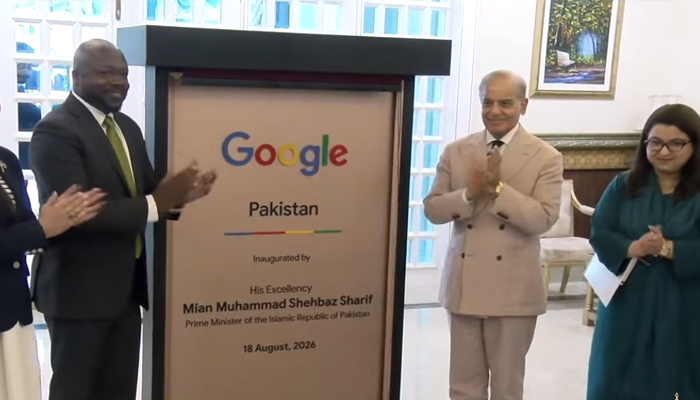
    Islamabad – Prime Minister Shehbaz Sharif inaugurated Google’s new office in Pakistan. On the occasion, the Prime Minister also met with a Google delegation where they discussed the promotion of digital technology in Pakistan and prospects for future cooperation. During the meeting, Prime Minister Shehbaz Sharif said that Pakistan marks the beginning of an important and exciting new journey for Google adding that there are enormous opportunities for Google in the country. The Prime Minister also emphasized the importance of promoting Pakistan’s digital economy and strengthening cooperation with international companies in the field of modern technology. On the occasion, Google’s Vice President said that the company seeks to establish a long-term partnership with Pakistan. He said further steps were needed to promote digital technology in the country. The Google Vice President also made an important announcement for Pakistani students stating that Pakistani students will soon be provided with free access to Google Gemini for one year. He said the initiative would give students access to modern artificial intelligence technology enabling them to benefit from it in their educational and research activities. The inauguration of Google’s office in Pakistan is being described as an important development for the promotion of digital technology, artificial intelligence and modern digital skills in the country.

  • Google hits record search traffic during FIFA World Cup match

    Google, the world’s most popular internet search engine processes more than 99,000 searches every second and nearly 9 billion searches every day. However, during a match at the 2026 FIFA World Cup, Google experienced the highest search traffic in its history. According to the company, the Round of 16 match between Argentina and Egypt set a new record for internet search activity. Nick Fox, Head of Google’s Knowledge and Information division said that on July 7 (July 8 in Pakistan Standard Time), search traffic reached its highest level in the company’s 28-year history immediately after Argentina scored the decisive goal. Although Google did not disclose the exact figures, a company spokesperson said that the winning goal triggered a record number of searches per second. The spokesperson added that, at that moment, it seemed as though the entire world was searching for the same thing online. The 2026 FIFA World Cup concluded with Spain defeating defending champions Argentina 1-0 in the final securing the country’s second World Cup title and its first in 16 years.

  • Google ends free Android backup storage for users

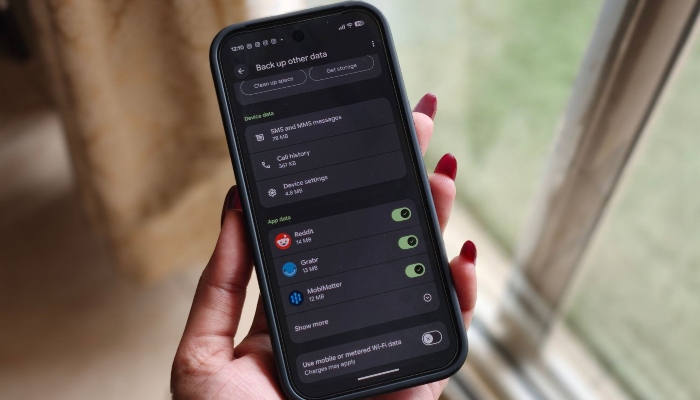
    Google has announced a major change to its cloud storage policy ending a long-standing free benefit for Google account users. Almost every internet user today relies on a Google account which comes with limited cloud storage. When users approach their storage limit, Google typically recommends upgrading to a paid plan for additional space. Until now, a user’s Google storage quota included Google Photos media files, Google Drive files and Gmail emails. Under the new policy, however, Android phone backup data will also count toward the account’s storage limit. Google informed users of the change through email giving them 45 days notice before the new policy takes effect. Once implemented, Android backup data including system settings, app data, SMS messages and call history will be included in the storage quota of a Google account. The company said the advance notice is intended to give users enough time to manage their storage or adjust their backup settings before the policy is enforced. Previously, only certain Android content, such as Google Photos uploads and MMS messages counted toward storage usage. Under the updated policy, complete Android backups are expected to consume a much larger portion of users available cloud storage. Google warned that if Android backups cause users to exceed their storage limit, they will either need to free up space in their Google account or subscribe to a paid Google storage plan for additional capacity. A Google spokesperson previously said that the average Android backup is expected to use around 40 MB of storage. The company also noted that users will have greater control over which data and apps are included in their backups. This marks another change to Google’s account storage policies. Earlier, in May 2026, the company began testing a reduction in free storage for new Google accounts lowering the limit from 15 GB to 5 GB.