facebook introduces free

Facebook introduces free verified badge with selfie verification

Meta announced in February 2023 that Facebook and Instagram users could obtain a verified account (blue checkmark) by paying a monthly subscription fee. Since then, users around the world have been able to subscribe to receive the blue verification badge.

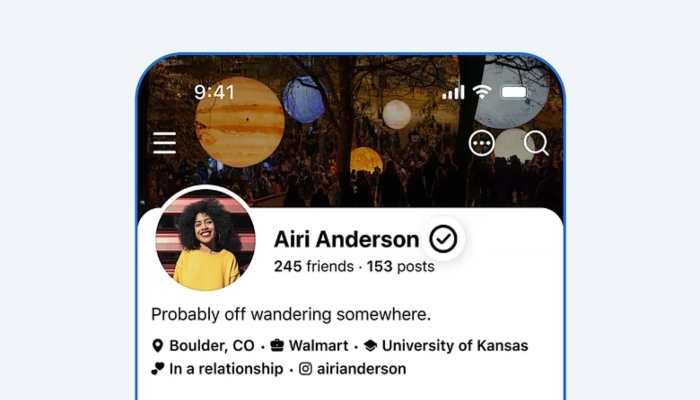
However, Meta has now introduced a new way for users to receive a free verification badge on their Facebook profiles, making the process much more accessible. The company has launched a new Facebook Verified program that uses a selfie-based facial recognition check along with a review of the user’s current profile photos.

According to Meta, the entire verification process takes only a few minutes to complete. The program is available only to users who are 18 years of age or older. Once a user successfully passes the selfie verification, a verified badge will appear next to their profile name across various Facebook services.

Unlike the paid blue checkmark, this free badge simply confirms that the profile belongs to a real person. It does not certify the person’s credibility or trustworthiness. The best part is that this verification badge is available free of charge.

Similar Posts

  • WhatsApp Web gets audio and video calling feature

    WhatsApp has introduced one of its most requested features for the web version of its messaging platform. The company has officially rolled out audio and video calling support for WhatsApp Web. In addition to voice and video calls, users will also get screen sharing, call reactions and a new Calls tab where they can view their call history and favorite contacts. According to the company, all calls on WhatsApp Web will be protected by end-to-end encryption, and there will be no time limit on calls. Users will also be able to seamlessly transfer an ongoing call from one device to another such as between the mobile app, WhatsApp Web and the desktop app. Meta has also added noise suppression allowing background sounds to be filtered out during calls for clearer audio. For video calls, users will be able to enjoy HD video quality by default as soon as the call begins. The rollout of these new features has already started and will gradually become available to WhatsApp users worldwide.

  • |

    7 easy tricks to boost internet speed on Android phones

    We all experience this: trying to load a webpage, stream a video or open an app on our Android phones. However, sometimes the internet becomes so slow that it feels like it is crawling. Slow internet on a phone affects downloads and uploads, websites take longer to open and videos may remain stuck instead of playing smoothly. Fortunately, Android phones offer several tools and tricks that can help improve internet speed. Clear background apps Apps running in the background use data, processing power and internet connectivity. Clearing or disabling unnecessary background apps can prevent them from affecting internet speed. For this purpose, go to Settings and disable unnecessary apps running in the background. Clear cache for faster internet When you use apps or visit websites on an Android phone, the device stores some data known as cache. These files are designed to help apps and websites run more efficiently and can be useful in the short term. However, when too many cache files accumulate, they may affect performance and internet speed. Therefore, clearing an app’s cache can help improve the device’s performance. To do this, go to Settings, select Apps, open the relevant app’s information page then select Storage and tap Clear Cache. Update operating system and apps Outdated operating systems and apps can affect performance and internet speed. Keeping your software and apps updated can help maintain better speed while also improving the overall performance of your phone. Use fast browser A web browser can directly affect your browsing experience and internet performance. Browsers such as Google Chrome and Firefox are regularly updated and their performance is continuously improved. Adjust Airplane Mode Airplane Mode on smartphones is primarily designed to disable radio-frequency signal transmission. When Airplane Mode is turned on, Wi-Fi, Bluetooth and cellular signals are switched off, stopping wireless communication. However, this feature can also be used to refresh your internet connection. Smartphones connect to nearby mobile towers for cellular signals. When you move around throughout the day, your phone may not always connect to the best available tower. Resetting the connection through Airplane Mode may help improve internet speed. Simply turn Airplane Mode on and wait for a short while before turning it off again. This may allow your Android phone to reconnect to a better mobile tower and improve internet speed. Restart your phone or router Restarting devices can also improve their performance. Restarting your smartphone or router may clear temporary errors and can sometimes help improve internet speed. Move closer to router Distance is important when using a Wi-Fi connection. If possible, move closer to your router. This can improve the signal strength and may result in a faster and more stable internet connection.

  • YouTube explains why it keeps changing its interface?

    YouTube’s user interface is frequently changed on both its mobile and web versions, something that many users do not particularly like. This raises the question of why YouTube keeps experimenting with its user interface especially since some changes become permanent while others are eventually reversed. Over the past year alone, more than half a dozen changes have been introduced to YouTube’s interface. YouTube has now explained why it continues to make these changes. YouTube Vice President Jonathan Tiedrsky discussed the matter in a blog post. He said the reason behind these continuous changes is quite simple. According to him, the purpose of these changes is to make the video-sharing platform easier to use. He added that YouTube does not want its user interface to become cluttered or confusing which is why the company continues to make adjustments. The company also explained that some of the recent changes such as redesigning buttons are intended to make them more noticeable and easier for users to identify. According to YouTube, these design improvements are also being extended to larger screens including smart TVs.

  • YouTube tightens policies on AI-generated videos

    YouTube has announced stricter policies for artificial intelligence (AI)-generated videos in an effort to curb low-quality and harmful content and prevent such videos from generating revenue. The company said the move comes as more creators are using AI tools to produce videos making it necessary to clarify its existing policies. According to YouTube, these are not entirely new rules. Instead, the company has updated the wording of its policies to make them clearer and easier for creators to understand. The revised guidelines place greater emphasis on AI-generated content that is repetitive, mass-produced or designed to manipulate or negatively influence viewers. YouTube said that while some of these videos may remain on the platform, they will not be eligible for monetization and will not be recommended to users. The company emphasized that creators should focus on quality, originality and context when producing AI-assisted content. YouTube also said it is working to distinguish useful and creative AI-generated content from AI-generated spam. According to the company, spam refers to videos that are uploaded in large numbers without meaningful effort, originality or consideration for quality. YouTube stressed that using AI tools is acceptable but creators are expected to include genuine human creativity and value in their videos. In its official statement, the company said that the latest update mainly provides clearer explanations of existing policies ensuring that creators are not caught off guard by sudden enforcement actions or policy crackdowns.

  • Instagram unveils new logo after 10 years

    Instagram has changed its logo after several years. Yes, Instagram has introduced a new logo which is a text-only logo. The announcement was made in a post by Adam Mosseri, head of the Meta-owned photo-sharing platform. He described the new logo as more refined and modern while maintaining the simplicity of the previous name. Mosseri said that Instagram’s logo was being changed after more than a decade because the previous design had begun to feel outdated. The new font used for the name has also changed the appearance of some of the letters in the word “Instagram.” Instagram last redesigned its logo in 2016, when it replaced the classic brown camera design with a colourful rainbow-style logo. Meta has not yet issued an official statement regarding the change.

  • YouTube app ends support for Android 6 phones

    YouTube is the world’s most popular video-sharing service watched by billions of people every day. The YouTube app is widely used on smartphones but some users will soon no longer be able to use it on their devices. Google is ending YouTube app support and access for smartphones running the Android 6 operating system. After the end of July 2026, Android 7 or later will be required to watch YouTube through the app on Android phones. It is important to note that YouTube will not suddenly stop working on affected phones nor will all data be deleted. Instead, phones running Android 6 will gradually begin experiencing problems. When users open the app, they may see a message saying “Switch to YouTube” after which they will be redirected to the mobile YouTube website through their phone’s browser. The main reason for this change is that YouTube is constantly being updated while new features may not work properly on older operating systems. For this reason, Google is ending YouTube support for Android 6 smartphones. If you are using an older Android phone and lose access to the YouTube app, you can still watch YouTube through its website using a browser. Another solution is to switch to a newer smartphone that supports the YouTube app.

Leave a Reply

Your email address will not be published. Required fields are marked *