error node modules react native reanimated src index.ts

error: node_modules/react-native-reanimated/src/index.ts

error: node_modules/react-native-reanimated/src/index.ts you need to complete the documentation of react-native-reanimated.Open the the babel.config.js file so the final code in babel.config.js will look below:- module.exports = { presets: [‘module:metro-react-native-babel-preset’], plugins: [‘react-native-reanimated/plugin’], }; error: node_modules/react-native-reanimated/src/index.ts,Requiring module “node_modulesreact-native-reanimated, Reanimated 2.5.0 breaks type checks,Error: Requiring module “node_modulesreact-native,ERROR Error: Requiring module “node_modules/react-native
failed to install the following sdk components build tools30 0 2 android sdk build tools 30 0 2

Failed to install the following SDK components: build-tools;30.0.2 Android SDK Build-Tools 30.0.2

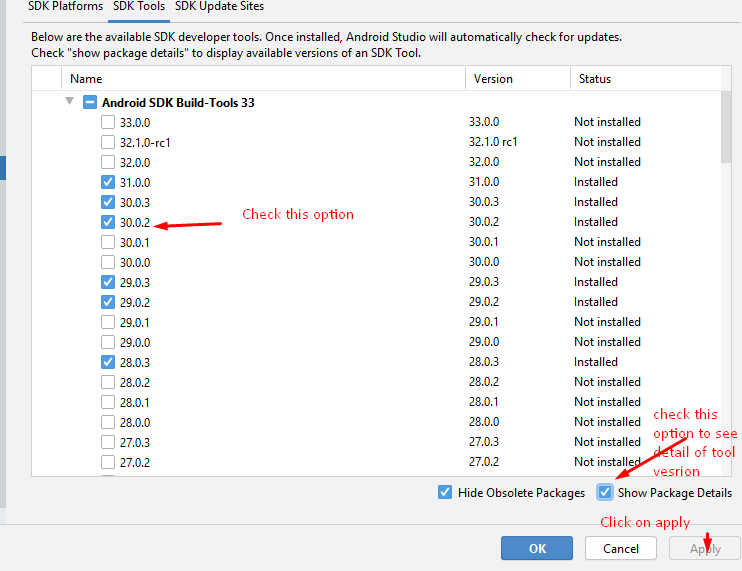
Failed to install the following SDK components: build-tools;30.0.2 Android SDK Build-Tools 30.0.2 You need to install SDK version 30.0.2 through the android studio. Please check the below screenshot:- Now clean your build using ./gradlew clean then run the app. Failed to install the following SDK components: build-tools;30.0.2 Android SDK Build-Tools 30.0.2, License for package Android […]

KeyStore file not set for signing config release

KeyStore file not set for signing config release

KeyStore file not set for signing config release You need to do signingConfig in the android/app/build.gradle file. buildTypes { release { // other settings signingConfig signingConfigs.release } } Add Keystore credentials like below:- signingConfigs { release { //if (project.hasProperty(‘MYAPP_RELEASE_STORE_FILE’)) { storeFile file(“key.keystore”) storePassword “****” keyAlias “myKey” keyPassword “****” // } } } keystore file not […]

Error useTheme must be used within NativeBaseConfigProvider

Error useTheme must be used within NativeBaseConfigProvider

Error useTheme must be used within NativeBaseConfigProvider You need to wrap your components inside NativeBaseProvider like below. Import NativeBaseProvider from the native base in your app.js import { NativeBaseProvider } from ‘native-base’; return ( {Your components} ); Error useTheme must be used within NativeBaseConfigProvider,uncaught error usetheme must be used within native base configprovider,error usetheme must […]

xcode error multiple commands produce accessibility resources

Multiple Commands produce error React Native

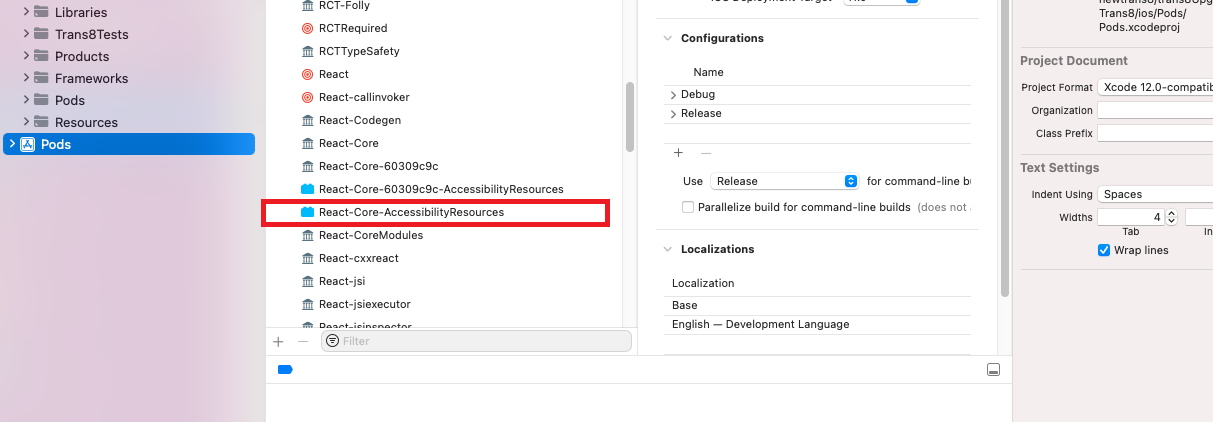
Multiple Commands produce error React Native Multiple commands produce ‘/Users/usename/Library/Developer/Xcode/DerivedData/myapp-brzdydrrbtppkifuoyasuqnozfiw/Build/Intermediates.noindex/ArchiveIntermediates/myapp/IntermediateBuildFilesPath/UninstalledProducts/iphoneos/AccessibilityResources.bundle’: 1) Target ‘React-Core-60309c9c-AccessibilityResources’ has create directory command with output ‘/Users/staplelogic/Library/Developer/Xcode/DerivedData/myapp-brzdydrrbtppkifuoyasuqnozfiw/Build/Intermediates.noindex/ArchiveIntermediates/myapp/IntermediateBuildFilesPath/UninstalledProducts/iphoneos/AccessibilityResources.bundle’ 2) Target ‘React-Core-AccessibilityResources’ has create directory command with output ‘/Users/staplelogic/Library/Developer/Xcode/DerivedData/myapp-brzdydrrbtppkifuoyasuqnozfiw/Build/Intermediates.noindex/ArchiveIntermediates/Trans8/IntermediateBuildFilesPath/UninstalledProducts/iphoneos/AccessibilityResources.bundle’ Solution Remove React-Core.common-AccessibilityResources from the Xcode Pods folder. After doing this code executes the pod install command in your project. Also, clear the derived data […]

how to redirect to url in a new tab

how to redirect to url in a new tab

How to redirect to url in a new tab window.open(‘https://vrsoftcoder.com/’, ‘_blank’); how to redirect to url in a new tab,javascript redirect new tab,javascript redirect to url new tab,js redirect new tab,js redirect to url in new tab,window.location redirect new tab,javascript redirect open new tab,javascript redirect in new tab,redirect javascript new tab,redirect to url javascript new […]

dyld Library not loaded rpath SocketIO framework SocketIO

dyld Library not loaded rpath SocketIO framework SocketIO

dyld: Library not loaded: @rpath/SocketIO.framework/SocketIO Referenced from: /Users/umang.arya/Library/Developer/CoreSimulator/Devices/DE6170BD-7841-496B-B533-F22AE109FEB6/data/Containers/Bundle/Application/2540A914-43AA-45B4-A71E-5559942E3B94/app.app/Frameworks/PayUCheckoutProKit.framework/PayUCheckoutProKit Reason: image not found. dyld Library not loaded rpath SocketIO framework SocketIO Developers facing this error in the IOS build of react-native. The solution to this problem is to add the below code snippet at the end in the pod file $dynamic_framework = [‘PayUAssetLibraryKit’, ‘PayUBizCoreKit’, ‘PayUCheckoutProBaseKit’, ‘PayUCheckoutProKit’, […]

React native app crashes on launch Android 12 1

React native app crashes on launch Android 12

React native app crashes on launch Android 12 To solve this error you need to add the below configuration:- Add below code in Android/App/build.gradle implementation “androidx.work:work-runtime-ktx:2.7.0” react native app crashes on launch android 12,App crashes randomly – only Android12,Android 12 crash: After adding notifee to react native project,React native app crashing on android 12+ on […]

No valid aps environment entitlement string found for application on app store scaled 1

No valid aps-environment entitlement string found for application on app store

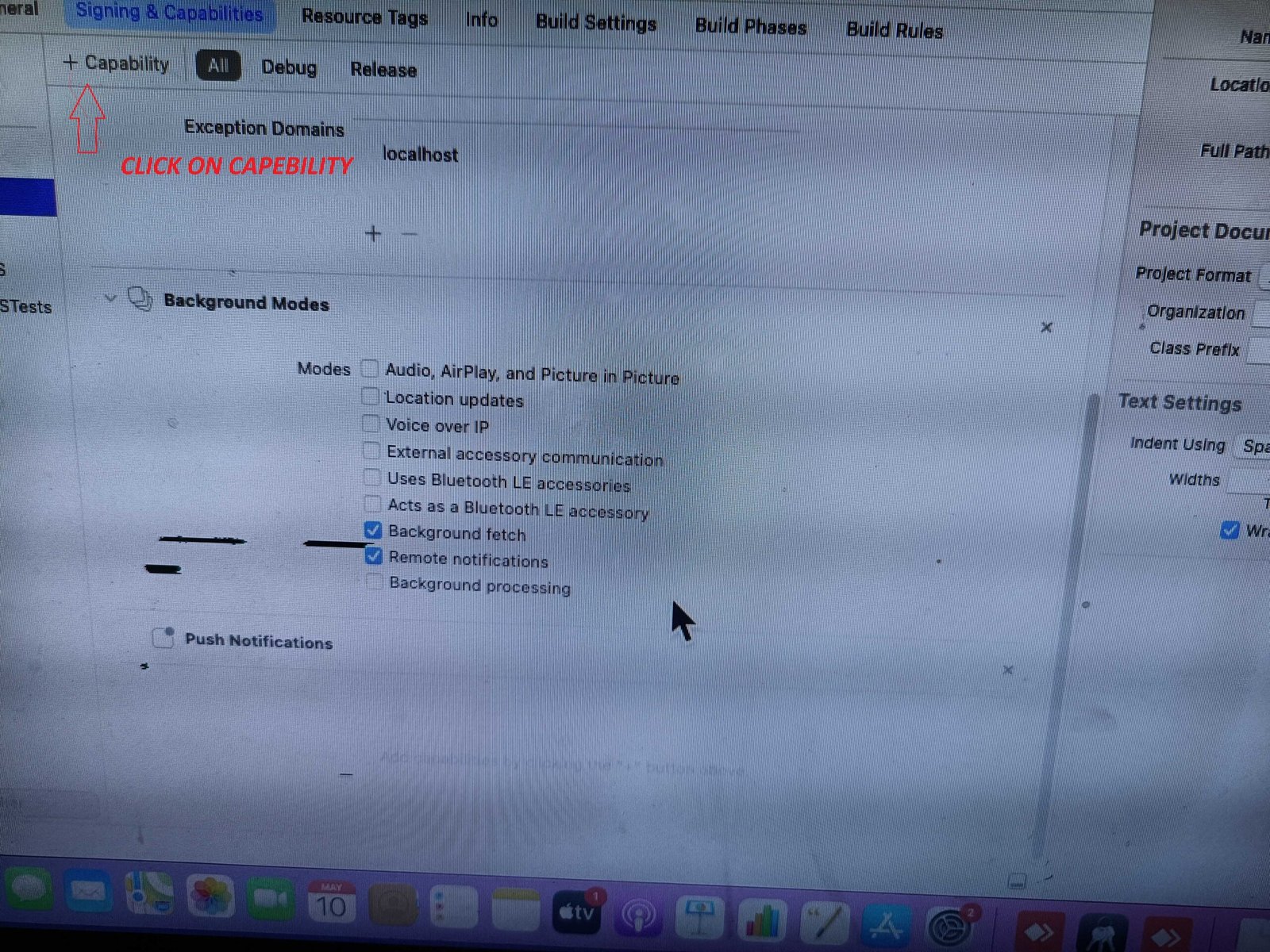
No valid aps-environment entitlement string found for application on app store To solve this error you need to add the push notification capability using Xcode like the below screenshot:- No valid aps-environment entitlement string found for application on app store, How to fix no valid aps-environment entitlement string found, no valid aps-environment entitlement string found […]

Scroll to Top