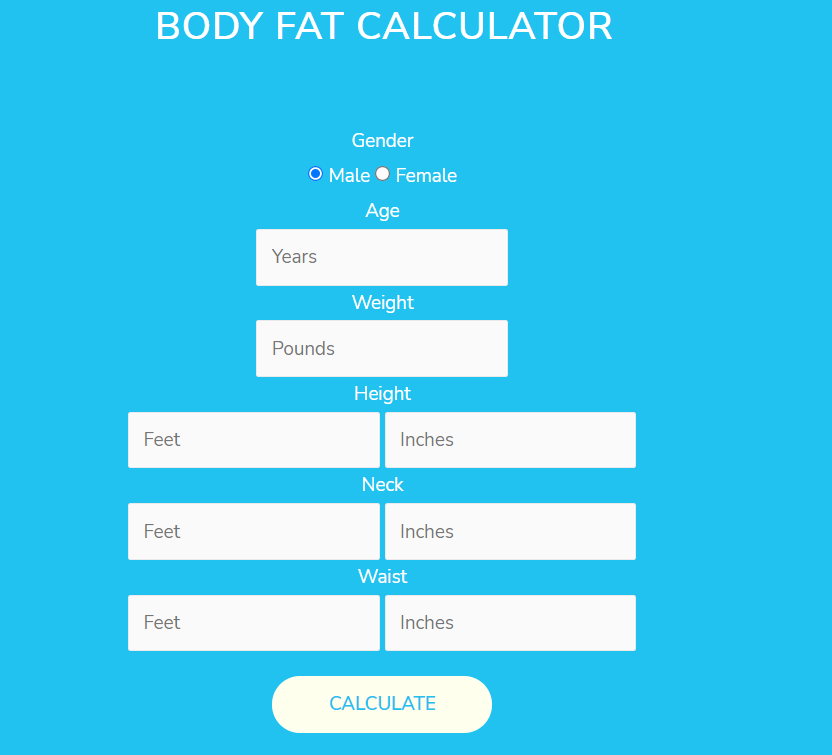
Body Fat Calculator Using JQuery and html
In this tutorial, I am showing you how to create a body fat calculator using HTML and jquery.
1) Create a form of below fields:-
2) Add some style
3) Add jquery library and below code snippet
');
// return false;
// }
// }
let gender = jQuery('input[name="fgender"]:checked').val();
let age = jQuery('#fAge').val();
let weight = jQuery('#fWeight').val();
weight = weight/2.2046;
let height = jQuery('#fHeight').val();
height = height*12;
let fHeightinch = jQuery('#fHeightinch').val();
height = parseFloat(height)+parseFloat(fHeightinch);
height = height*2.54;
let neck = jQuery('#fNeck').val();
neck = neck*12;
let neckinch = jQuery('#fNeckinch').val();
neck = parseFloat(neck)+parseFloat(neckinch);
neck = neck*2.54;
let waist = jQuery('#fWaist').val();
waist = waist*12;
let waistinch = jQuery('#waistinch').val();
waist = parseFloat(waist)+parseFloat(waistinch);
waist = waist*2.54;
let hip = jQuery('#fHip').val();
hip = hip*12;
let hipinch = jQuery('#hipinch').val();
hip = parseFloat(hip)+parseFloat(hipinch);
hip = hip*2.54;
console.log(weight,height,waist,neck,hip);
let bfp = '';
if(gender=='male'){
bfp = 495/(1.0324 - 0.19077*Math.log10(waist-neck) + 0.15456*Math.log10(height)) - 450;
}else{
bfp = 163.205 * Math.log10(math.unit(waist, 'cm').toNumber('in') + math.unit(hip, 'cm').toNumber('in') - math.unit(neck, 'cm').toNumber('in')) - 97.684 * Math.log10(math.unit(height, 'cm').toNumber('in')) - 78.387;
}
jQuery('#bodyFatRes').html('You body Fat Percentage is: '+bfp+' %
Below is the demo of the Above code:-
Please follow and like us: